
 Written by
 When you register a plugin step, there is a field where you can specify some configuration parameters for the plugin execution:
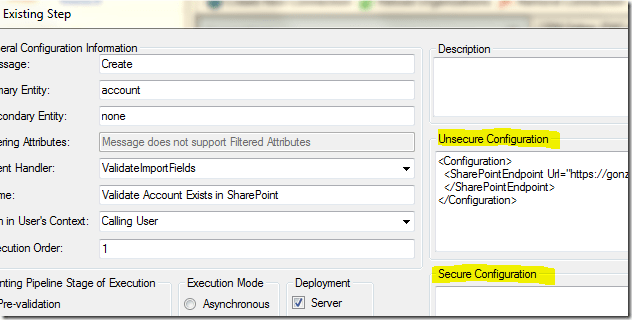
Then in the Constructor of your plugin class you will get the configuration value which you can use later in the Execute method:
public abstract class BasePlugin : IPlugin
{
private string _secureConfig = null;
private string _unsecureConfig = null;
public BasePlugin(string unsecureConfig, string secureConfig)
{
_secureConfig = secureConfig;
_unsecureConfig = unsecureConfig;
}
public void Execute()
{
// Use the configuration here
}
}
There are two different kinds of Configurations.
Secure Configuration:
PROS:
- The step configuration is solution-aware so it will be automatically transported with the plugin step.
CONS:
- You need to use the plugin registration tool or another application to update the step configuration.
- The configuration is step-specific so you have to provide it and/or update it for every step even if the value is the same for all the steps (the configuration is on each step instead of the assembly or plugin type).
- the configuration is just an attribute of the plugin step so you cannot control privileges on the configuration independently from privileges on plugin step entity.
Non- Secure Configuration:
PROS:
- The configuration data can be secured as any other entity using the CRM security model. This is useful when the configuration contains sensitive information such as passwords.
CONS:
- Secure configuration is not solution aware so you will need to configure it for each environment.
- You need to use the plugin registration tool or another application to update the step configuration.
The configuration is step-specific so you have to provide it and/or update it for every step even if the value is the same for all the steps (the configuration is on each step instead of the assembly or plugin type).
**For CRM 2011 Training, please check out our CRM Training page. Please share |Like in Facebook if you feel like this page is useful.
 Dynatecon Solutions