
 Written by
 📌 Problem We Faced:
We had a custom JavaScript validation in our Power Apps Model-Driven form. The goal was simple:
👉 Show an error if the user enters a future date.
We used this script:
if(fieldValue && fieldValue > today) {
    showerror
}
At first, it worked fine. But then… 💥 in some systems, even when users entered today’s date, it triggered an error ❗
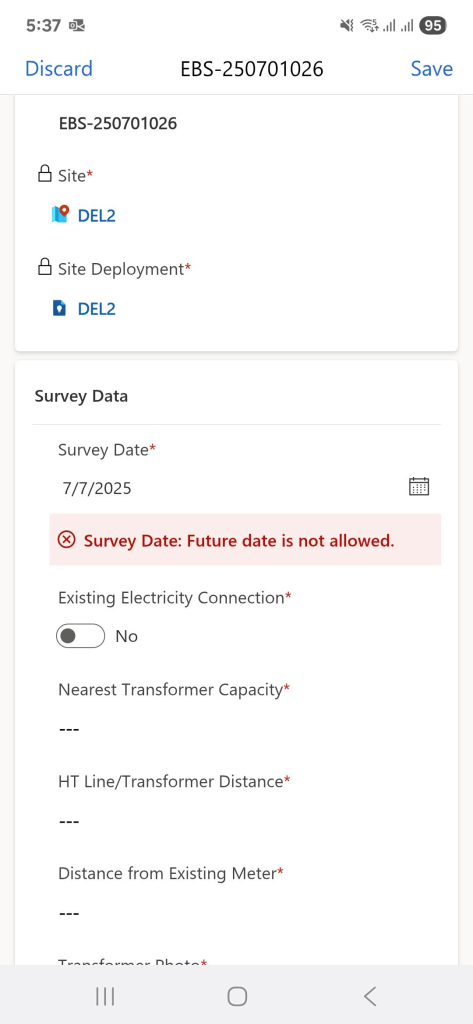
But Why? 😕
We checked using alert(fieldValue) and alert(today). Both showed:
🗓️ Wed Jul 07 2025 00:00:00 GMT+0400
So what’s the issue?
🧠 The Hidden Problem: Timezones & Milliseconds
There are two main reasons why this issue occurred:
1️⃣ JavaScript Date includes time
Even if it looks like just a date, it still has hours, minutes, and milliseconds behind the scenes.
- today was normalized to midnight (00:00:00)
- But fieldValue might be 00:00:00.001 or even stored in UTC (like T00:00:00Z), making it appear slightly ahead of local time
2️⃣ Dataverse stores dates in UTC, but JavaScript uses local time
So even if both are “July 9”, internally:
| fieldValue | 2025-07-09T00:00:00Z (UTC) |
| today | 2025-07-09T04:00:00+04:00 (local) |
This means: fieldValue > today → true ❌ (Incorrectly shows an error)
✅ The Solution: Normalize Dates Before Comparing
We rewrote our code to remove the time part completely before comparing.
function toDateOnly(date) {
    return new Date(date.getFullYear(), date.getMonth(), date.getDate());
}

var today = toDateOnly(new Date());
var fieldDate = fieldValue ? toDateOnly(fieldValue) : null;

if (fieldDate && fieldDate > today) {
    // Show error
}
Now, the comparison is based purely on the date — not the time or timezone.
🛠️ Final Working Function
function toDateOnly(date) {
    return new Date(date.getFullYear(), date.getMonth(), date.getDate());
}

function validateNoFutureDate(executionContext, fieldSchemaName, errorId, errorMessage) {
    var formContext = executionContext.getFormContext();
    var fieldAttr = formContext.getAttribute(fieldSchemaName);
    var fieldControl = formContext.getControl(fieldSchemaName);

    if (!fieldAttr || !fieldControl) return;

    var fieldValue = fieldAttr.getValue();
    var today = toDateOnly(new Date());
    var fieldDate = fieldValue ? toDateOnly(fieldValue) : null;

    if (fieldDate && fieldDate > today) {
        fieldControl.addNotification({
            messages: [errorMessage || "Future date is not allowed."],
            notificationLevel: "ERROR",
            uniqueId: errorId
        });
    } else {
        fieldControl.clearNotification(errorId);
    }
}

window.MyLibrary = window.MyLibrary || {};
window.MyLibrary.validateNoFutureDate = validateNoFutureDate;
🔚 Summary
If you’re working with dates in Power Apps or any web app, always normalize them before comparing. Timezones and milliseconds can cause silent bugs — just like this one.
 Dynatecon Solutions