
How to create a Prospect in Dyna Projects(Project Operations app in Power Apps) Steps: Click on the Prospects in the left navigation bar Click '+New' button 3. Fill in the fields 4. Click Save & Close button 5.You can view the created Prospect from the Prospects view. How to create a Timesheet Entry in Dyna…
Tag: PowerApps
Manage Field visits and Incidents from mobile device using Power App (Canvas App): Incidents Hub

Welcome to this step-by-step guide on building a simple Canvas App called "INCIDENTS HUB" using Microsoft PowerApps. The INCIDENTS HUB app will help users track and manage incidents efficiently, offering an easy-to-use interface for viewing, adding, and updating incident records. Prerequisites An active Microsoft PowerApps account. Basic understanding of PowerApps interface and functions. A data…
Open Power Apps Custom Page from Dataverse Subgrid
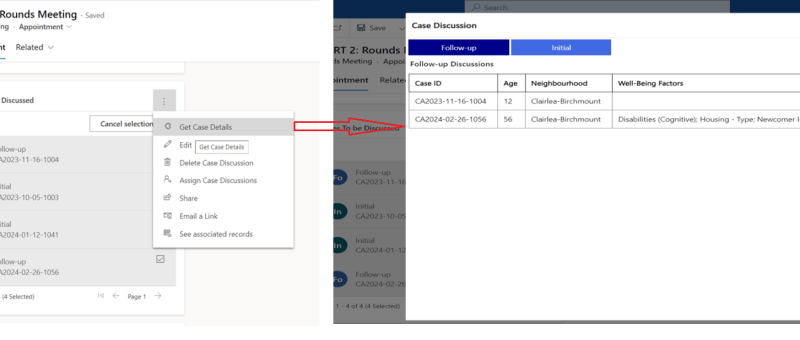
In the dynamic world of PowerApps, the ability to easily navigate between components is most important. One powerful feature that elevates user experience is the capability to open custom pages directly from a Dataverse subgrid. This functionality not only streamlines processes but also empowers users with a more personalized interface. REQUIREMENT In this situation, there's…
PowerApps for Nonprofits: Why should you choose?

If you work at a nonprofit, you should understand the benefits of Microsoft PowerApps for nonprofits. What is PowerApps? Microsoft PowerApps is a tool that aims to place all the power of software design into the hands of non-coders. You can create custom apps from scratch to solve all your nonprofit’s unique problems. And thanks…
Exception handling in Power Automate
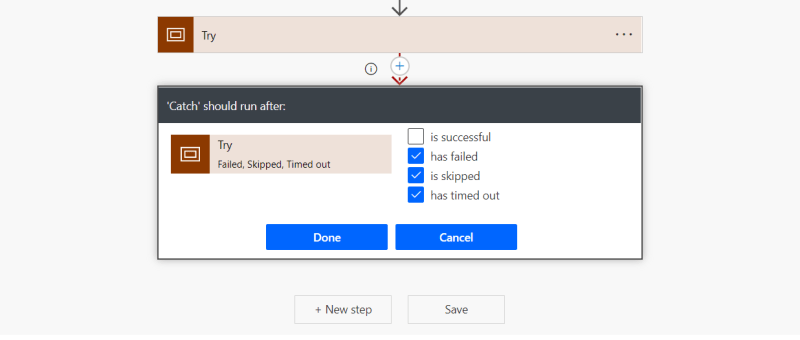
Exception handling is the most common practice used in programming to tackle unwanted or unexpected events. Since exception handling deals with anomalies, it avoids program error, flow error and system crashing. There are many reasons which can cause exceptions, including expression error, invalid user input, loss of network connection, user attempting to open files which…
 Dynatecon Solutions