Skip to content
Dynatecon Solutions

Dynatecon Solutions

Let's talk about quick and affordable digital transformation

  • HOME
  • ABOUT US
    • WHAT WE DO
    • OUR WORK
    • OUR CLIENTS
  • PRODUCTS
    • Microsoft 365
    • Dynamics 365 Business Central
    • Dynamics 365 Sales
    • Dynamics 365 Customer Service
    • Dynamics 365 Human Resources
    • Power BI
    • Power Automate
    • Power Apps
      • DynaPro – Prospect and Project Management Solution in Microsoft Power platform
  • SERVICES
    • Digital Transformation
    • DynaTectice™
    • Modernize Workplace
  • PARTNERS
  • CONTACT US
  • BLOG
  • CAREERS

Tag: Visio

Design flows in Microsoft Visio

Posted on 17 Mar 2021by Dynatecon Solutions

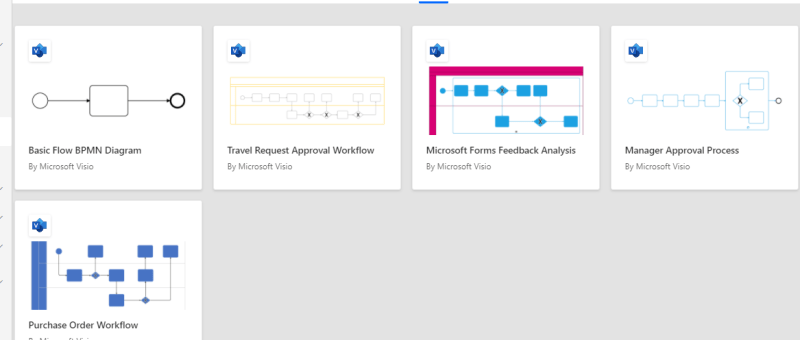
The Power Automate designer is a rich tool in which you can configure every detail of your logic. However, sometimes you may want to just sketch your flow logic before you start building your flow. To do this, use Microsoft Visio directly from within Power Automate.

Posted in Power Automate
Tagged Power Automate, Visio

OUR CREDENTIALS!

Recent Posts

  • MCP-Powered Assistant: An AI Agent Built with Copilot Studio and Dataverse
  • Build an Employee Management Copilot Agent in Microsoft Copilot Studio: Step-by-Step Guide
  • Building the HR Assistant Copilot Agent – A Smart HR Solution with Microsoft Power Platform
  • Building a Conversational Car Assistant with Microsoft Copilot Studio
  • Filtering Users Based on Their Team in Dynamics 365 Using JavaScript
  • Building a Dynamic Chat Interface: React-based PCF Control
  • Sending Adaptive Cards in Outlook via Power Automate (Test User Setup Guide)
  • Migrate Configurations and Data across Power Platform Environments via CMT
  • “Automating Renewal Reminder Emails in Dynamics 365 with Power Automate (Handling UTC Date Filtering)”
  • 🚫 Fixing “Future Date” Validation Errors in Power Apps (Even for Today’s Date!) 

Enter your email address to follow Dynatecon blog and receive notifications of new posts by email.

Top Posts & Pages

  • Sending Adaptive Cards in Outlook via Power Automate (Test User Setup Guide)
  • How to call a 'Custom API developed in Dynamics 365' via Postman
  • Use Environment variables in Power Automate to Create Folder in SharePoint
  • Populate Lookup fields and Text fields from an Entity to Another Entity using JavaScript - Dynamics 365 CRM
  • Variables vs Compose in Power Automate: What’s the Difference and When to Use?

CRM Providers Dynamics 365 Interview Questions Microsoft CRM 2011 Microsoft Dynamics MS CRM 2011 Training Power App Power Automate Power Platform Uncategorized

Tags

ai Case Study CRM 2011 JavaScript CRM 2011 Training Dynamics 365 Dynatecon Case Study Microsoft CRM Microsoft CRM 2016 Microsoft CRM Interview Questions Oracle CRM Oracle CRM Interview Questions Power Apps Power Automate Power Platform technology
2025 Dynatecon Solutions
  • HOME
  • ABOUT US
  • PRODUCTS
  • SERVICES
  • PARTNERS
  • CONTACT US
  • BLOG
  • CAREERS
Website Powered by WordPress.com.
  • FB
  • Linkedin
  • Twitter
  • Contact Us
  • Subscribe Subscribed
    • Dynatecon Solutions
    • Join 25 other subscribers
    • Already have a WordPress.com account? Log in now.
    • Dynatecon Solutions
    • Subscribe Subscribed
    • Sign up
    • Log in
    • Report this content
    • View site in Reader
    • Manage subscriptions
    • Collapse this bar
 

Loading Comments...