Skip to content
Dynatecon Solutions

Dynatecon Solutions

Let's talk about quick and affordable digital transformation

  • HOME
  • ABOUT US
    • WHAT WE DO
    • OUR WORK
    • OUR CLIENTS
  • PRODUCTS
    • Microsoft 365
    • Dynamics 365 Business Central
    • Dynamics 365 Sales
    • Dynamics 365 Customer Service
    • Dynamics 365 Human Resources
    • Power BI
    • Power Automate
    • Power Apps
      • DynaProcure – Procurement Transformation on Microsoft Power Platform
      • DynaPro – Prospect and Project Management Solution in Microsoft Power platform
  • SERVICES
    • Digital Transformation
    • DynaTectice™
    • Modernize Workplace
  • PARTNERS
  • CONTACT US
  • BLOG
  • CAREERS

Tag: Visio

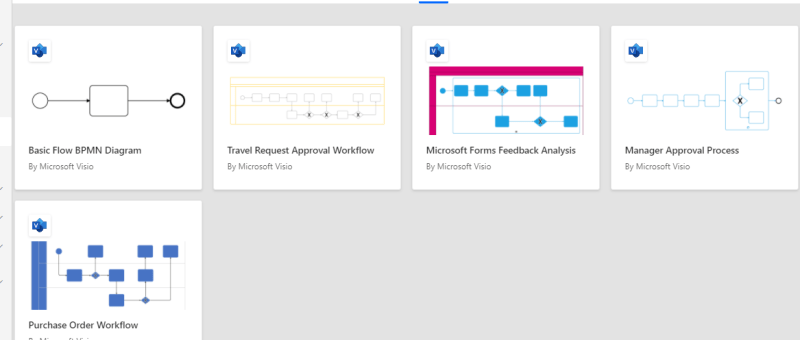
Design flows in Microsoft Visio

Posted on 17 Mar 2021by Dynatecon Solutions

The Power Automate designer is a rich tool in which you can configure every detail of your logic. However, sometimes you may want to just sketch your flow logic before you start building your flow. To do this, use Microsoft Visio directly from within Power Automate.

Posted in Power Automate
Tagged Power Automate, Visio

OUR CREDENTIALS!

Recent Posts

  • Azure SQL to Microsoft Dataverse Integration Using Azure Data Factory
  • Unlocking Even Greater Value: Microsoft 365 Copilot + Power Apps for Intelligent Procurement
  • Integrate Field Service Bookings with Outlook Calendars
  • Transforming Procurement with Microsoft Power Apps: From Manual Processes to Intelligent Operations
  • Elastic Tables in Dataverse: When to Use Them and How to Implement Them Step by Step
  • Optimizing a Sales KPI Report in Power BI for Better Sales Visibility
  • How to Fix Missing “Description/Email Body” Field in Dynamics 365 Email Form Using Rich Text Editor Control
  • LS Central + Dynamics 365 Business Central for Retail Domain. Why it’s a great combo?
  • Creating an Intelligent “Canteen Meal Booking Agent” with Microsoft Copilot Studio and Dataverse
  • Building a Microsoft Teams Bot to Search and Display Products from an API

Enter your email address to follow Dynatecon blog and receive notifications of new posts by email.

Top Posts & Pages

  • Custom Lookup Filtering In Basic Forms - Power Pages
  • Dynamics 365 - Populate Rich text control within a document template using Power Automate
  • Sending Adaptive Cards in Outlook via Power Automate (Test User Setup Guide)
  • How to Build a Parameterized Environment-Switching Data Source in Power BI for Dataverse (Production-Ready Approach)
  • Call Custom Page with parameters from Model Driven App - Using New Command Editor

CRM Providers Dynamics 365 Interview Questions Microsoft CRM 2011 Microsoft Dynamics MS CRM 2011 Training Power App Power Automate Power Platform Uncategorized

Tags

ai artificial-intelligence Case Study CRM 2011 JavaScript Dynamics 365 Dynatecon Case Study Microsoft CRM Microsoft CRM 2016 Microsoft CRM Interview Questions Oracle CRM Oracle CRM Interview Questions Power Apps Power Automate Power Platform technology
2026 Dynatecon Solutions
  • HOME
  • ABOUT US
  • PRODUCTS
  • SERVICES
  • PARTNERS
  • CONTACT US
  • BLOG
  • CAREERS
Website Powered by WordPress.com.
  • FB
  • Linkedin
  • Twitter
  • Contact Us
  • Subscribe Subscribed
    • Dynatecon Solutions
    • Join 25 other subscribers
    • Already have a WordPress.com account? Log in now.
    • Dynatecon Solutions
    • Subscribe Subscribed
    • Sign up
    • Log in
    • Report this content
    • View site in Reader
    • Manage subscriptions
    • Collapse this bar
Loading Comments...