Skip to content
Dynatecon Solutions

Dynatecon Solutions

Let's talk about quick and affordable digital transformation

  • HOME
  • ABOUT US
    • WHAT WE DO
    • OUR WORK
    • OUR CLIENTS
  • PRODUCTS
    • Microsoft 365
    • Dynamics 365 Business Central
    • Dynamics 365 Sales
    • Dynamics 365 Customer Service
    • Dynamics 365 Human Resources
    • Power BI
    • Power Automate
    • Power Apps
      • DynaPro – Prospect and Project Management Solution in Microsoft Power platform
  • SERVICES
    • Digital Transformation
    • DynaTectice™
    • Modernize Workplace
  • PARTNERS
  • CONTACT US
  • BLOG
  • CAREERS

Omni channel Hub – key features available vs missing

DYNATECON's avatarWritten by DYNATECON

Posted on 7 Sep 20197 Sep 2019

Omnichannel for Customer Service is a paid add-on to Dynamics 365 Customer Service apps that use the Unified Interface. It is available only when you purchase a subscription of Chat for Dynamics 365.
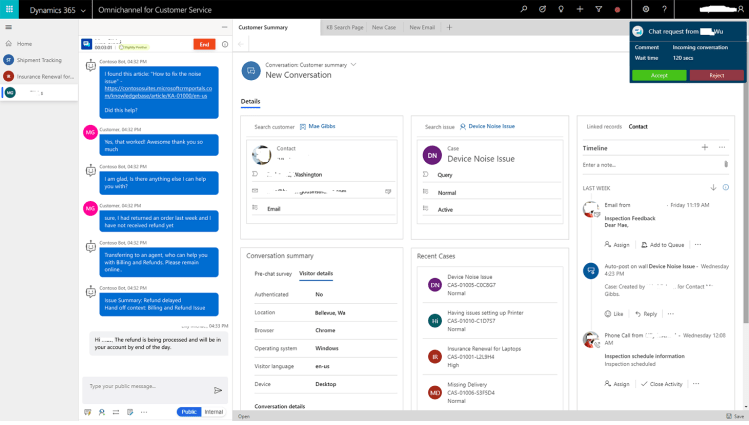
A quick look at the Omni channel hub features – as on Sep 2019:

  • Live chat feature is really stable and easy to configure
  • Intra day monitoring – enables the live monitoring of chat conversations in progress and availability of agent
  • Quality monitoring – Supervisors would be able to monitor the quality of chat conversations
  • Chat Consult/Transfer features work well
  • Multi session options within the browser gives better user experience
  • Chat quick response has the intellisense search

What’s lacking currently:

  • File transfer within the chat – expects this to be available end of Q4 2019.
  • Limited notification options – Sound notification for incoming chat requests
  • Limited data types in pre-chat survey questions – Checkbox is not supported in the current version
  • Language specific quick responses  are not available
  • Option to copy the knowledge article content to the chat message is not available
  • Showing the chat widget’s online presence based on the agent’s availability

Even though the pricing is on the higher side consodering the other platforms offering the chat solution as an add-on, investing in Microsoft’s own solution could be more advantageous considering:

  • Microsoft is investing more to bring more features in to Omni channel hub
  • Seamless upgrade makes it easier to get access to new features as they release
  • OOB AI and strong analytical capabilities would lessen the additional investments on those areas.

Related

Posted in Dynamics 365, Omni-channel Engagement Hub, Uncategorized
Tagged Dynamics 365, Live Chat, Omni-channel Engagement Hub
Unknown's avatar

About the Author: DYNATECON

We are a group of Dynamics 365 / Digital Transformation Consultants. We consult and support businesses in their digital tranformation journey through Dynamics 365. To get the latest posts, follow our FB page: https://www.facebook.com/dynamicscrmguru

View all posts by DYNATECON

  • Personal website

Post navigation

Previous Entry Custom Auto numbering in Dynamics 365 and how to ensure accurate sequencing in the auto number generated
Next Entry Keyboard Shortcuts in Dynamics 365

OUR CREDENTIALS!

Recent Posts

  • MCP-Powered Assistant: An AI Agent Built with Copilot Studio and Dataverse
  • Build an Employee Management Copilot Agent in Microsoft Copilot Studio: Step-by-Step Guide
  • Building the HR Assistant Copilot Agent – A Smart HR Solution with Microsoft Power Platform
  • Building a Conversational Car Assistant with Microsoft Copilot Studio
  • Filtering Users Based on Their Team in Dynamics 365 Using JavaScript
  • Building a Dynamic Chat Interface: React-based PCF Control
  • Sending Adaptive Cards in Outlook via Power Automate (Test User Setup Guide)
  • Migrate Configurations and Data across Power Platform Environments via CMT
  • “Automating Renewal Reminder Emails in Dynamics 365 with Power Automate (Handling UTC Date Filtering)”
  • 🚫 Fixing “Future Date” Validation Errors in Power Apps (Even for Today’s Date!) 

Enter your email address to follow Dynatecon blog and receive notifications of new posts by email.

Top Posts & Pages

  • Sending Adaptive Cards in Outlook via Power Automate (Test User Setup Guide)
  • Use Environment variables in Power Automate to Create Folder in SharePoint
  • How to call a 'Custom API developed in Dynamics 365' via Postman
  • Populate Lookup fields and Text fields from an Entity to Another Entity using JavaScript - Dynamics 365 CRM
  • Integrating Dynamics 365 with External APIs: Sending Data via Custom Actions and Plugins

CRM Providers Dynamics 365 Interview Questions Microsoft CRM 2011 Microsoft Dynamics MS CRM 2011 Training Power App Power Automate Power Platform Uncategorized

Tags

ai Case Study CRM 2011 JavaScript CRM 2011 Training Dynamics 365 Dynatecon Case Study Microsoft CRM Microsoft CRM 2016 Microsoft CRM Interview Questions Oracle CRM Oracle CRM Interview Questions Power Apps Power Automate Power Platform technology
2025 Dynatecon Solutions
  • HOME
  • ABOUT US
  • PRODUCTS
  • SERVICES
  • PARTNERS
  • CONTACT US
  • BLOG
  • CAREERS
Website Powered by WordPress.com.
  • FB
  • Linkedin
  • Twitter
  • Contact Us
  • Subscribe Subscribed
    • Dynatecon Solutions
    • Join 25 other subscribers
    • Already have a WordPress.com account? Log in now.
    • Dynatecon Solutions
    • Subscribe Subscribed
    • Sign up
    • Log in
    • Copy shortlink
    • Report this content
    • View post in Reader
    • Manage subscriptions
    • Collapse this bar
 

Loading Comments...