Skip to content
Dynatecon Solutions

Dynatecon Solutions

Let's talk about quick and affordable digital transformation

  • HOME
  • ABOUT US
    • WHAT WE DO
    • OUR WORK
    • OUR CLIENTS
  • PRODUCTS
    • Microsoft 365
    • Dynamics 365 Business Central
    • Dynamics 365 Sales
    • Dynamics 365 Customer Service
    • Dynamics 365 Human Resources
    • Power BI
    • Power Automate
    • Power Apps
      • DynaPro – Prospect and Project Management Solution in Microsoft Power platform
  • SERVICES
    • Digital Transformation
    • DynaTectice™
    • Modernize Workplace
  • PARTNERS
  • CONTACT US
  • BLOG
  • CAREERS

How to configure Omnichannel Live chat in Dynamics 365

Dynatecon Solutions's avatarWritten by Dynatecon Solutions

Posted on 17 Sep 202117 Sep 2021

In the modern era, any contact center implementation should enable multiple support channels for their customers or prospects. This will ensure that proper support is given to their customers as well as it can increase the number of enquiries from potential customers to drive sales growth.

Customer Service Channels expected in a Modern Contact Center are:

  • Phone
  • Email
  • Live Chat
  • Self Service Portal
  • Social Media (Facebook | Twitter | Whatsapp etc)
  • Virtual Agent

With Dynamics 365, it’s fairly easy to get started with multi channel support center and can be enabled within days or weeks!!! Yes, its true. This also one of the reasons why there is a huge demand in Dynamics 365 platform for enabling Customer Service Center. Let’s have a look at how an organization can enable Dynamics 365 Omnichannel. First of all, it’s not just one application we need to enable, but there are couple of components related need to be configured and provisioned. Also, licensing also an important factor to be discussed in detail.

Core Components

  • Dynamics 365 Customer Service (mandatory)
  • Dynamics 365 Omnichannel (Mandatory)
  • Dynamics 365 Customer Service Portal (Optional – recommended)
  • Power BI (Required for dashboards)
  • Power Platform Virtual Agent (Optional – recommended)

Let’s look at the architecture diagram for a typical Dynamics 365 Omnichannel + Customer Service implementation:

Let’s look at how to configure the Omnichannel:

  1. Get your Dynamics 365 for Customer Service instance up and running (either Production or Trial). In case of trial version, skip to step 3 as by default Omnichannel is provisioned in Dynamics 365 Customer Service trial.
  2. In case of production, once the Customer Service App is installed and environment is up and running, we need to provision Omnichannel . You may find the latest set of instruction on provisioning Omnichannel in this link
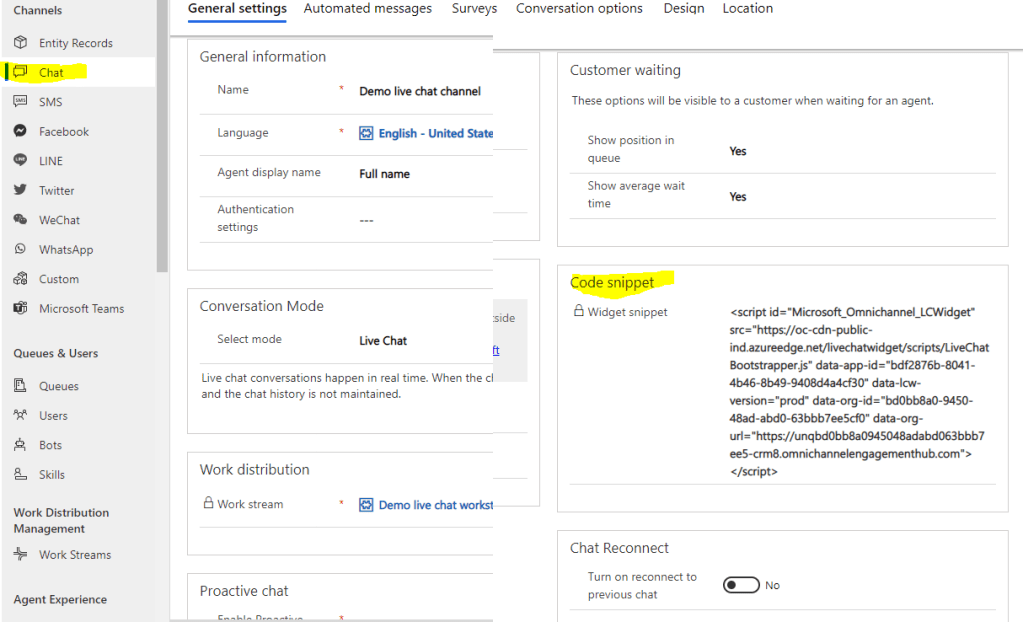
  3. Go to the Omnichannel for Administration App and configure the Live chat widget, setup the Queues, Setup Workstream, Setup Routing Rules etc. You may find more detailed instruction here:
  4. Once the chat widget is configured, you may copy paste the chat widget url in any web page (or in w3schools editor https://www.w3schools.com/html/tryit.asp?filename=tryhtml_default) to test out the chat widget.
Chat widget would be opened once ready
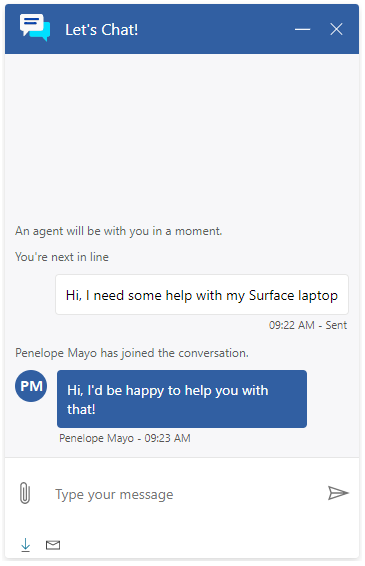
Chat widget in maximized mode.

5. You should be able to test out the chat widget and live chat activity in the Dynamics 365 Omnichannel for Customer Service App. New chat requests would be routed to the agents logged in (in this application)
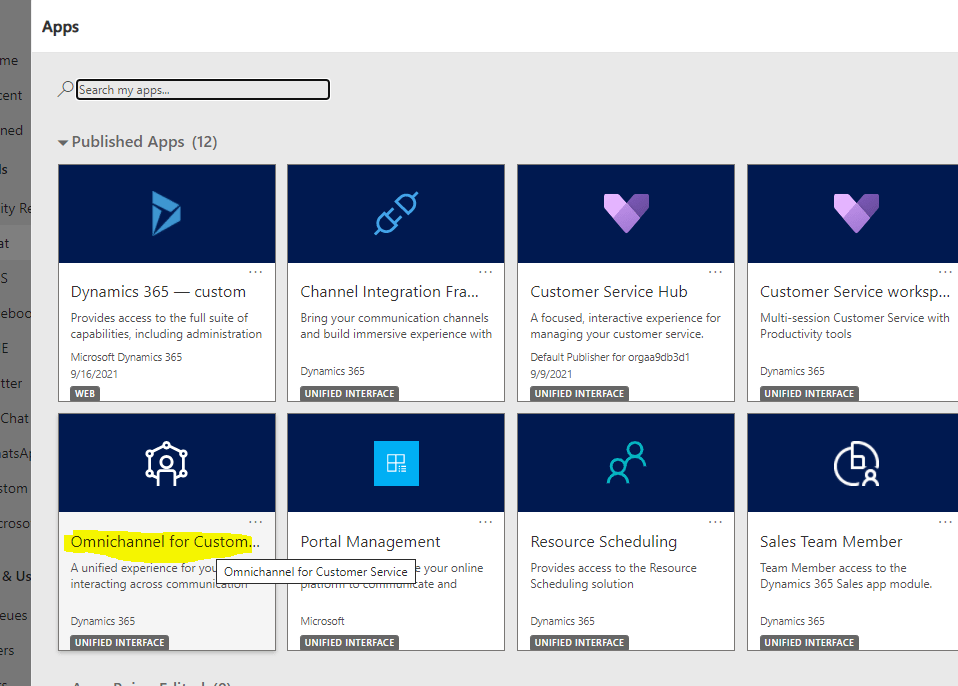


Hope this helps! To know more about the licensing cost and best practices in implementation, please connect with our Dynamics 365 Customer Service + Omnichannel experts!!
Let’s connect

Related

Posted in Dynamics 365, Dynamics 365 Portals, Omni-channel Engagement Hub
Tagged Customer Self Service Portal, Dynamics 365 Customer Service, Dynamics 365 Portals, Live Chat, Omnichannel, Twitter Integration
Unknown's avatar

About the Author: Dynatecon Solutions

We’re a group of digital transformation enablers who have a deep appreciation and understanding of how business can be transformed digitally thus to help companies to increase their revenue using Microsoft tools like Office 365, Microsoft 365, Power Platform, Dynamics 365 and Azure. To know more about our services and products, please write to us at info@dynatecon.com

View all posts by Dynatecon Solutions

  • Personal website

Post navigation

Previous Entry Migrate Auto Record Creation Rules & SLAs to UCI before Oct 21!
Next Entry How to control the list of ‘Resolution Type’ options in the ‘Case Resolution’ window? OOB Way

OUR CREDENTIALS!

Recent Posts

  • Building a Dynamic Chat Interface: React-based PCF Control
  • Sending Adaptive Cards in Outlook via Power Automate (Test User Setup Guide)
  • Migrate Configurations and Data across Power Platform Environments via CMT
  • “Automating Renewal Reminder Emails in Dynamics 365 with Power Automate (Handling UTC Date Filtering)”
  • 🚫 Fixing “Future Date” Validation Errors in Power Apps (Even for Today’s Date!) 
  • Leveraging TeamMembership_Association for Dynamic Team Filtering in Power Automate Cloud Flows
  • How to create a new Contact in Power Apps based Project tracking tool?
  • How to add new Partner in Power Apps based Project tracking tool?
  • How to add new Estimation to a Project in Power Apps based Project tracking tool?
  • How to add new Expense to a Project in Power Apps based Project tracking tool?

Enter your email address to follow Dynatecon blog and receive notifications of new posts by email.

Top Posts & Pages

  • Call Custom Page with parameters from Model Driven App - Using New Command Editor
  • Use Environment variables in Power Automate to Create Folder in SharePoint
  • Dynamics 365 - Populate Rich text control within a document template using Power Automate
  • How to call a 'Custom API developed in Dynamics 365' via Postman
  • Show and Hide Subgrid Based on Field Value Using JavaScript in MS Dynamics 365 CRM

CRM Providers Dynamics 365 Interview Questions Microsoft CRM 2011 Microsoft CRM 2013 Microsoft Dynamics MS CRM 2011 Training Power Automate Power Platform Uncategorized

Tags

Case Study CRM 2011 JavaScript CRM 2011 Training Dynamics 365 Dynamics CRM Interview Questions Dynatecon Case Study Microsoft CRM Microsoft CRM 2016 Microsoft CRM Interview Questions Oracle CRM Oracle CRM Interview Questions Power Apps Power Automate Power Platform Siebel CRM
2025 Dynatecon Solutions
  • HOME
  • ABOUT US
  • PRODUCTS
  • SERVICES
  • PARTNERS
  • CONTACT US
  • BLOG
  • CAREERS
Website Powered by WordPress.com.
  • FB
  • Linkedin
  • Twitter
  • Contact Us
  • Subscribe Subscribed
    • Dynatecon Solutions
    • Join 27 other subscribers
    • Already have a WordPress.com account? Log in now.
    • Dynatecon Solutions
    • Subscribe Subscribed
    • Sign up
    • Log in
    • Copy shortlink
    • Report this content
    • View post in Reader
    • Manage subscriptions
    • Collapse this bar
 

Loading Comments...