
 Written by
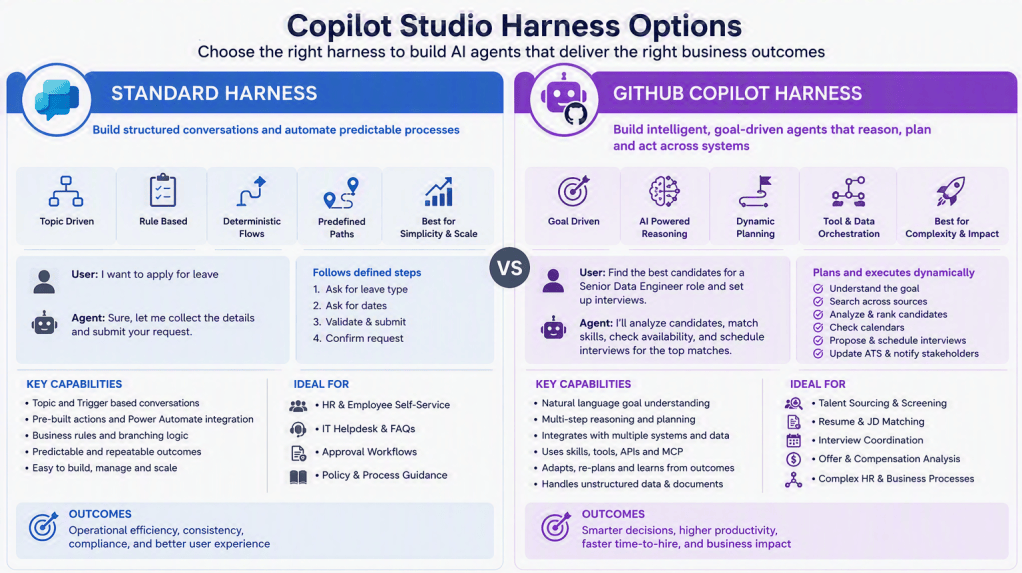
 Based on Microsoft’s current Copilot Studio architecture, the GitHub Copilot Harness is not just a newer UI. It is a fundamentally different orchestration runtime designed for agentic, reasoning-heavy workloads, whereas the Standard Harness remains the best choice for deterministic, process-driven conversational agents
Executive Summary
| Area | Standard Harness | GitHub Copilot Harness |
|---|---|---|
| Primary Design | Rule-based conversational agent | Goal-based AI agent |
| Agent Behavior | Follows predefined topics, triggers, and flows | Creates and adapts execution plans dynamically |
| Authoring Approach | Topics, nodes, conditions, agent flows | Natural language instructions, skills, tools |
| Orchestration | Deterministic | Agentic and reasoning-based |
| Multi-Step Decision Making | Limited | Native capability |
| Error Recovery | Explicit branching required | Can re-plan and recover autonomously |
| File Operations | Usually via external flows | Native Word, Excel, PowerPoint, PDF handling |
| Memory | Traditional session context | Persistent memory support |
| Skills | Not available | Native Skills framework |
| Connected Agents | Limited | Native support |
| MCP Support | Limited | Supported |
| Best For | FAQ, HR bot, Helpdesk bot, approval routing | AI analyst, AP automation, underwriting assistant, audit agent |
| Billing Model | Traditional Copilot Studio model | Copilot Credits consumption |
| Complexity | Low to Medium | Medium to Very High |
Architectural Difference
Standard Harness
Think of it as:
“If user says X → execute Y”
You explicitly define:
- Topics
- Trigger phrases
- Conversation paths
- Decision branches
- Power Automate actions
The agent follows the path you designed and generally does not deviate.
Example:
User: Check loan statusStep 1: Ask loan numberStep 2: Call APIStep 3: Show result
Good when process is known in advance.
GitHub Copilot Harness
Think of it as:
“Here is the goal. Figure out how to achieve it.”
The agent:
- Understands the objective
- Plans actions
- Chooses tools
- Calls multiple systems
- Evaluates outcomes
- Re-plans if needed
Example:
User: Investigate why branch risk score increased last month
Agent may:
- Query OMS data
- Query audit findings
- Query customer complaints
- Analyze trends
- Generate explanation
- Create PowerPoint summary
without you explicitly designing every branch.
Comparison Matrix: When to Choose Each
Scenario-Based Guidance
| Use Case | Standard Harness | GitHub Copilot Harness | Recommendation |
|---|---|---|---|
| Employee FAQ Bot | ✅ | Possible but overkill | Standard |
| Leave Request Assistant | ✅ | Possible | Standard |
| IT Helpdesk Triage | ✅ | ✅ | Standard unless diagnosis is complex |
| Customer Service Chatbot | ✅ | ✅ | Standard |
| Guided Loan Application | ✅ | ✅ | Standard |
| Approval Routing | ✅ | ✅ | Standard |
| Lead Qualification Agent | ✅ | ✅ | Standard |
| KYC Verification Agent | ⚠️ | ✅ | GitHub Harness |
| Financial Analysis Agent | ❌ | ✅ | GitHub Harness |
| Audit Assistant | ❌ | ✅ | GitHub Harness |
| Risk Scoring Agent | ❌ | ✅ | GitHub Harness |
| AP Invoice Processing | ⚠️ | ✅ | GitHub Harness |
| Procurement Copilot | ⚠️ | ✅ | GitHub Harness |
| Contract Review Agent | ❌ | ✅ | GitHub Harness |
| Multi-System Investigation Agent | ❌ | ✅ | GitHub Harness |
| AI Research Agent | ❌ | ✅ | GitHub Harness |
| Executive Reporting Agent | ❌ | ✅ | GitHub Harness |
Dynatecon helps organizations design and implement AI-powered recruitment solutions using Microsoft Copilot Studio, Dynamics 365, Power Platform, and Azure AI. Based on the business objectives and process complexity, we leverage either the Standard Harness for structured workflow automation or the GitHub Copilot Harness for intelligent, reasoning-driven recruitment agents. Our approach combines process automation, AI-driven candidate evaluation, seamless integration with HR and ATS platforms, and robust governance to deliver tangible outcomes such as reduced time-to-hire, improved candidate quality, enhanced recruiter productivity, and a superior hiring experience.

