
Sometimes it’s easy to clone the servers and update the server configurations than setting up a new server from scratch. This is indeed helpful when you need to setup a similar server with same configuration for testing purposes. We recently did a CRM On Premise server(s) clone to setup a new test environment for performance…
BLOG
How to restore Encryption Key in Dynamics 365 / Microsoft CRM

Encryption in CRM is enabled for a good cause and sometimes it can cause a stop in the development activities - when it comes to Email integration or Queue management. This happens especially when there is no proper maintenance of CRM Deployment or transition of Support activities without proper knowledge transfer. Team literally gets stuck…
Unified Service Desk 3.3.0 is Released
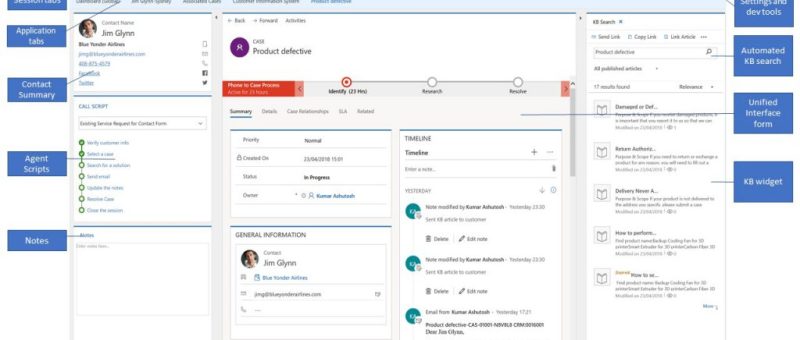
Latest version of Unified Service Desk - Unified Service Desk 3.3.0 is released and available to download. Unified Service Desk 3.3.0 is packed with many improvements and features such as: Host Unified Interface Apps in Unified Service Desk Analyze best practices in Unified Service Desk (Tool) Custom Styles field in Toolbar Capture Performance Data Host…
Digital Transformation With Dynamics 365 – Free Webinar
Guys, there is an upcoming webinar [free of cost] which might be useful for many of us. Key agenda of the webinar is to show how digital transformation can be made possible with Dynamics 365 platform. Check the below link and reserve your seat. Digital Transformation With Dynamics 365
Documents link is missing in Dynamics 365 9.0 version – Standard Form
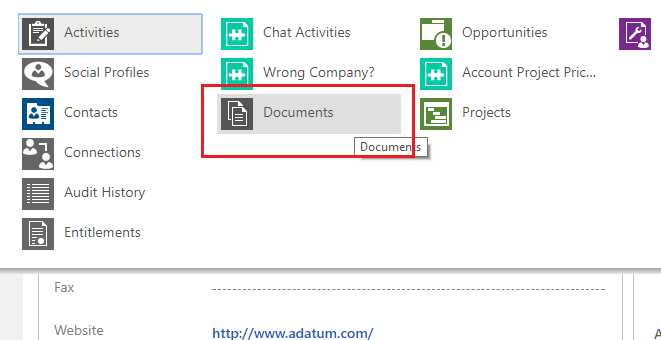
While doing a test run of SharePoint - Dynamic 365 9.0 version [Server Side Integration], we just noticed that the "Documents" link in missing in the Standard Form for Accounts but is available in the Interactive Experience Form. Accounts - Standard Form> Accounts - Interactive Experience Form (Available in Customer Service Hub only)> …
USD & Dynamics 365 – Cafex Live Assist – Chat Application Review
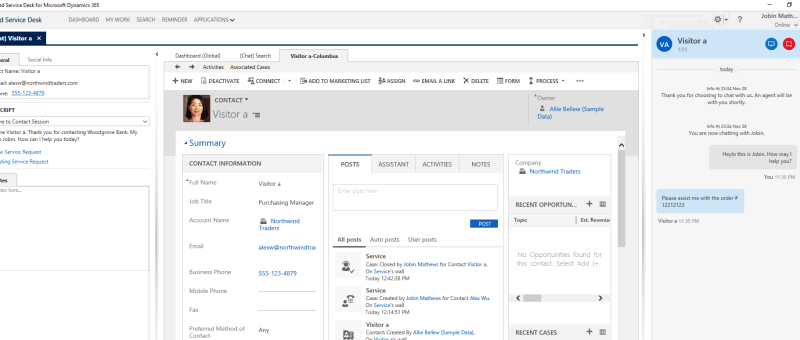
We had a new requirement to enable basic chat feature in one of the CRM implementations and we were considering few solutions for this. 'Cafex - Live Assist' is one of the chat solutions you may consider if you are in search of an independent chat solution [not part of CTI integration] to work in…
USD: How to show popup notifications in USD

As part of our new dynamics 365 project - which is for building the service module for contact center, we have several use cases to show popup notifications in USD. Few use cases would be: Alert the agent when the customer record opens in USD - in case if there is an immediate action…
Customer 360 View in Microsoft CRM – What does it really mean and how to achieve?

For any CRM implementation, Customer 360 view is an inevitable component client would ask for or expect to include even if not mentioned explicitly. Though the client requirement is often a one liner "Need Customer 360 View in place", most of the times CRM analyst has to do lot of Q&A sessions to conclude what…
Editable Grid available in CRM On Premise- Dynamics 365 Update 2.1 Feature
"Editable Grid" is a significant feature and surprisingly it has been delayed to introduce in Microsoft CRM. Though it has been released in the online version way before, Microsoft has just introduced it in the On Premise version - Dynamics 365 Update 2.1 (On Premise). By Default "Editable Grid" would be disabled and it…
Dynamics 365 Update 2.1 (CRM On Premise Upgrade) Available Now
Microsoft has published the latest update for CRM - Dynamics 365 Update 2.1 and is available to download. To Learn more about the Dynamics 365 2.1 features and fixes: To Download Dynamics 365 2.1: If you need any assistance upgrading your current implementation, please contact us. We would be happy to help you assisting…
Actions to improve performance in Microsoft CRM On Premise – 24 Checks
Performance is always a great concern for any CRM implementation and there are few key things need to consider when analyzing performance improvement. I thought it would be helpful if I summarize the basic key checks to be done to improve the performance in Microsoft CRM On premise deployment. 1. Check - Principal Object Access…
Dynamics 365 On premise update is now available with exciting new features
Microsoft has announced the Microsoft Dynamics 365 Dec 2016 Update (CRM) with the exciting new features and bug fixes Key features: Editable Grid Concurrently running Business Processes Interactive Service Hub enhancements Email engagement Mobile App enhancements Dynamics 365 App for outlook enhancements Link to download the update: https://www.microsoft.com/en-us/download/details.aspx?id=54515 Link to the KB article…
Strange Error while scheduling Service Activity in CRM 2016 – An Error Has occurred. Please return to homepage and try again.
We got a strange error [strange JavaScript popup alert] while scheduling service. Searching for the similar error in google did not help either. It took almost 2 days to narrow down the issue and find the root cause. If you come across the same issue, this post might help you. Issue: An error while scheduling…
Unable to add Webresource/IFRAME in CRM 2016 Interactive Service Hub form – Resolved in Update 8.1
If you are using CRM 2016 [Version 8.0] and without Update 1 installed, you might notice that Interactive Service form doesn't have option to include 'Web resource' and 'IFRAME' component which is a great drawback. Many users have complained about this and Microsoft has fixed this in Microsoft CRM 2016 Update 1 release. You would…
Unable to login to Dynamics CRM error while generating Crm proxy class – CrmSvcUtil
If you are experiencing the error 'Unable to login to Dynamics CRM' while generating the CRM Proxy class using CrmSvcUtil tool, you should try this to resolve it. There is a new command parameter added to the CrmSvcUtil tool : interactivelogin:true You may append this command parameter to your CrmSvcUtil command line and this would give you a pop…
Integrating On Premise applications with CRM Online via Azure Service Bus
In enterprise solution scenarios, it is very much required to integrate CRM online with on premise line of business applications. Microsoft Azure Service Bus is used to facilitate integration between CRM online and 'on premise' line of business applications. This article describes the steps to configure azure service bus queue for CRM online integration. Steps to configure…
What is ‘Ticker Symbol’ field format in Microsoft CRM?
Ticker Symbol is a one of the formats of field type ‘Single Line of Text’ in Microsoft CRM. This is a kind of text field which stores the value as string but clicking on this field value would open the ‘MSN money page’ [Stock Market details] for the text in the field value. In…
How to create and configure Calculated field in CRM 2015
"Calculated Field" is a new feature introduced in CRM 2015 which can be used to store calculated values. The key benefit is, this can be setup from CRM UI without any code. Let’s have a look at how to setup this field type and the scope of this field type in implementations. Here the requirement is to…
How to create and configure Rollup field in CRM 2015
"Rollup Field" is a new feature introduced in CRM 2015 which can be used for setting up extended fields to store aggregated values. The key benefit is, this can be setup from CRM UI without any code. Let’s have a look at how to setup this field type and the scope of this field type…
How to enable Business Rule to execute server side in CRM 2015?
In CRM 2015, there is a very important update which can be considered for replacing many workflows or plugins – Executing Business Rules from Server Side code. When Business Rule feature was introduced in CRM 2013, it was capable of executing from client side alone and with the 2015 update, we now be able…

